Help Center
Receive BRC-20 Tokens
Cryptocurrency users can now easily receive BRC-20 tokens in Leather by utilizing their Taproot address. These tokens, minted using the Ordinals protocol, can be seamlessly managed within the Leather app for iOS and Android. By copying and sending the Taproot address listed under the 'BRC-20' option, users can receive their tokens and view them under the 'Assets' tab in the tokens section of the app.
Apr 24, 2025
Similar to receiving Ordinal inscriptions, users will need their Taproot address (which starts with “bc1p”) to receive BRC-20 tokens given that these tokens are minted using the Ordinals protocol.
How to Receive BRC-20 Tokens in Leather
- Hit the “Receive” button in the main menu of your extension
- Make sure the “Tokens” tab is selected
- Copy the Taproot address listed with the “BRC-20” option
- Paste and send your address to the intended sender
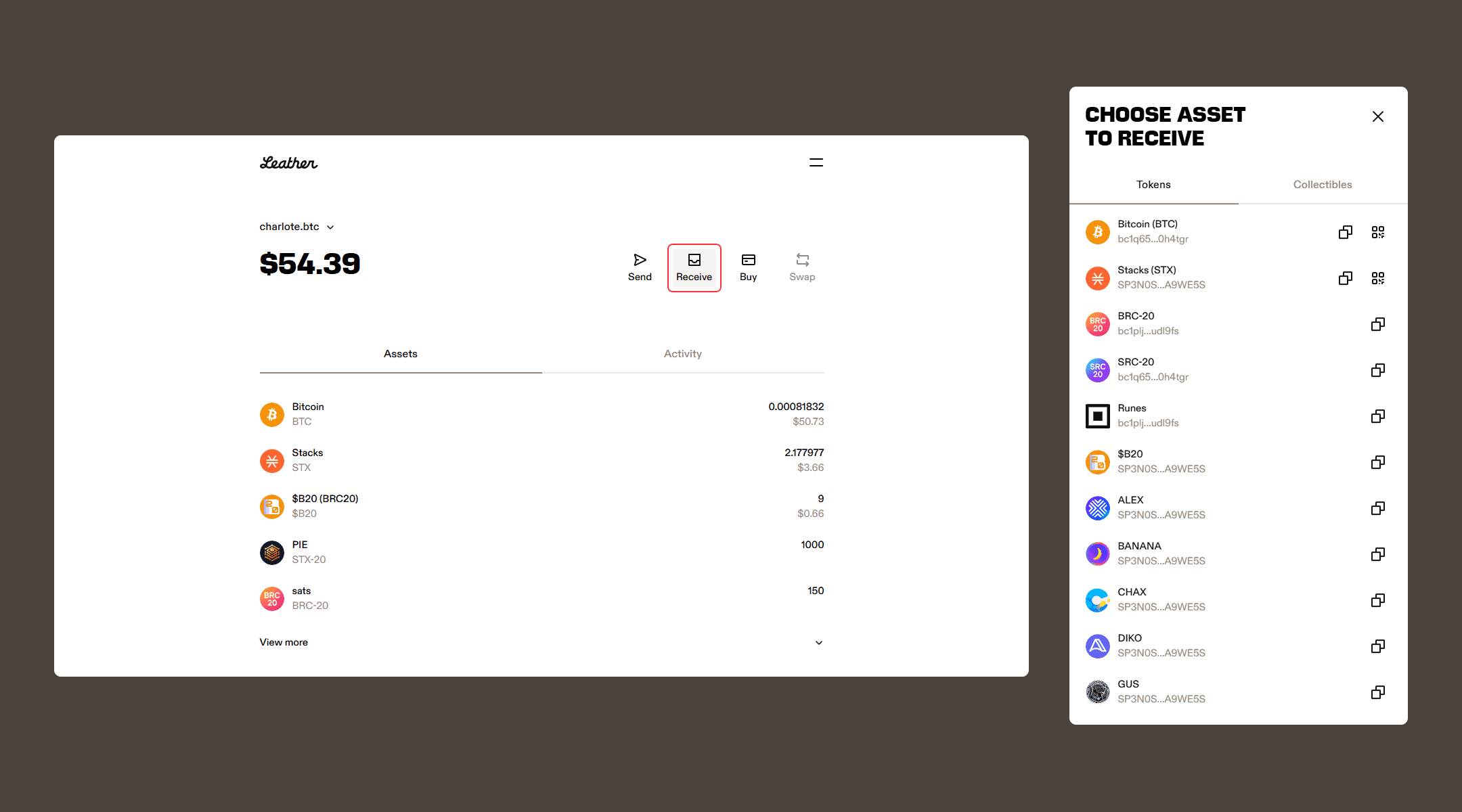
Once the transaction has been confirmed by the Bitcoin network, the BRC-20 tokens you’ve received will appear under the “Assets” tab in your tokens section.
Related articles
Disclaimer
Leather does not have control over the minting process of BRC-20 tokens or the transactions involving them. Users are responsible for ensuring the accuracy and security of their Taproot address when receiving tokens in Leather.