Receive SRC-20 Tokens
Cryptocurrency users can now easily send and receive SRC-20 tokens through Leather's platform. By following a few simple steps, users can securely manage their SRC-20 tokens within their Leather wallet.
Jul 8, 2024
Leather also supports SRC-20 tokens, meaning that users can also send and receive SRC-20 tokens using the Native SegWit address associated with a wallet.
How to Receive SRC-20 Tokens in Leather
- Hit the “Receive” button in the main menu of your extension
- Make sure the “Tokens” tab is selected
- Copy the Native SegWit address (which starts with “bc1q”) listed with the “SRC-20” option
- Paste and send the copied address to the intended sender
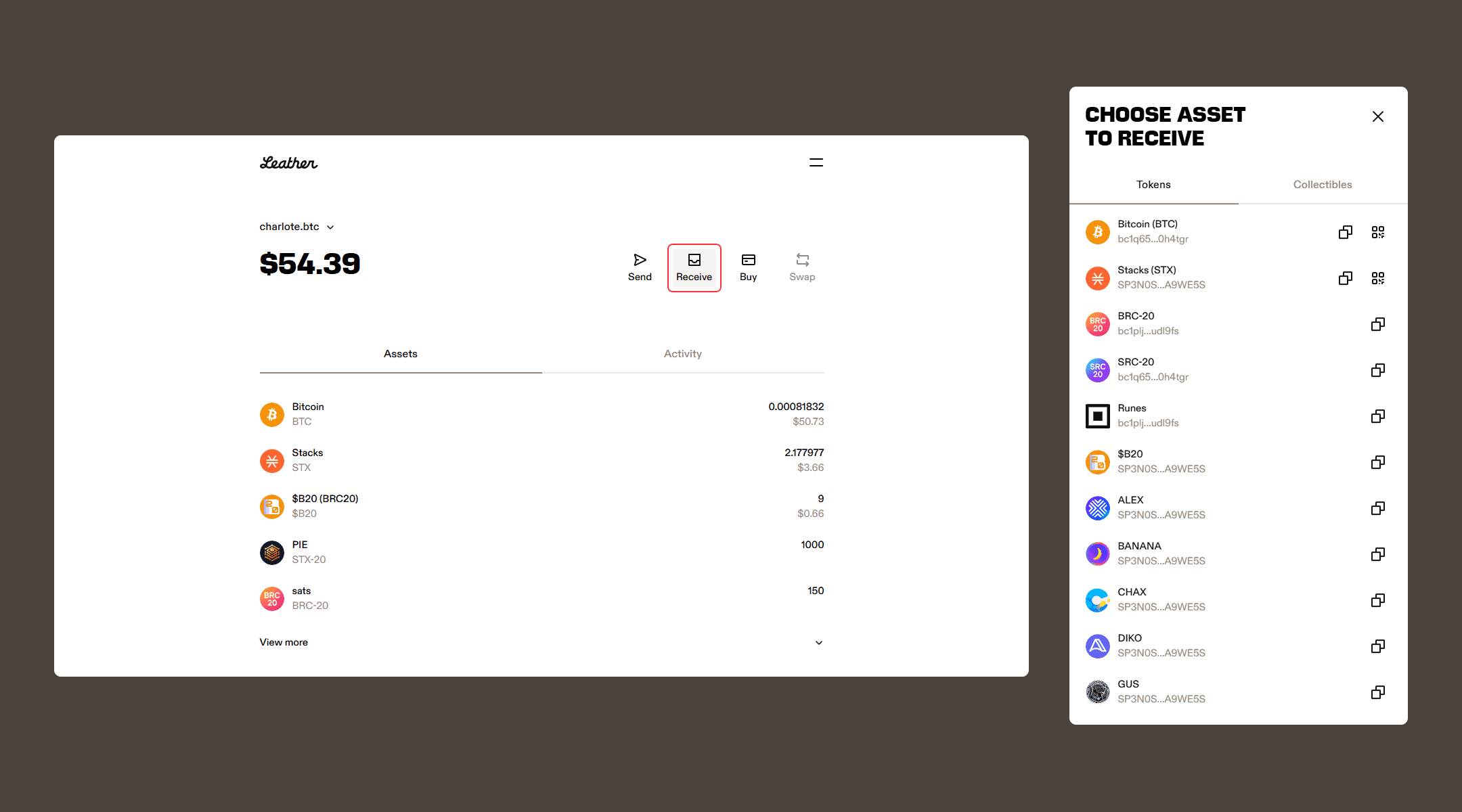
Once the transaction has been confirmed by the Bitcoin network, the SRC-20 tokens you’ve received will appear under the “Assets” tab in your tokens section.
Hardware wallet users should note that there are certain limitations to sending and receiving SRC-20 tokens. Consequently, we emphasize using the Leather extension to conduct SRC-20 transactions.
Disclaimer
Leather does not have control over the SRC-20 tokens themselves, and users are responsible for ensuring the accuracy and security of their transactions.