Help Center
Wallet
How do I unprotect bitcoin(UTXO’s) with inscriptions so it becomes available?
When you have inscriptions, Leather wallet does its best to protect the UTXO’s that hold these. In normal cases ordinal inscriptions are “padded” with small amounts of bitcoin in UTXO’s typically between 546 and 10000 sats. Just to make sure to remain above the dust limit.
However when you receive bitcoin from a central exchange it can have accidental (and perhaps unwanted) inscriptions in much larger UTXO’s. If that is the case you can unprotect all UTXO’s to make the bitcoin available. Do the following:
Unprotect all inscriptions/UTXO’s:
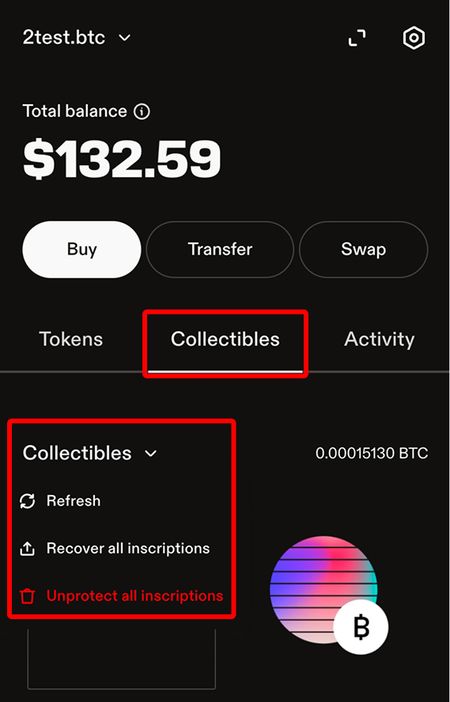
- Go to the collectibles tab in your Leather extension
- Click the arrow next to the collectables title
- Then click “Unprotect all inscriptions”
- And then see the balance, on the native segwit address available again.
Unprotect a selection of inscriptions:
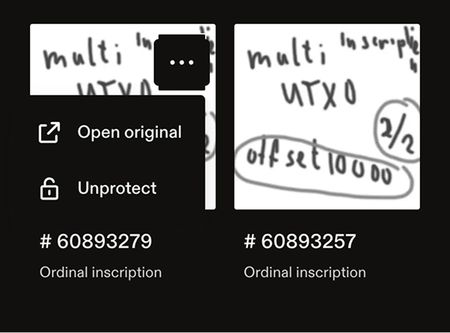 This can be helpful when you have inscriptions in your wallet that you do care about. Then you can selectively select which inscriptions you want to unprotect.
- Click the collectables tab in your Leather extension
- Scroll to the collectable you want to unprotect
- Hover over it with your mouse
- Click the top right corner menu
- And then click “Unprotect”