Help Center
Receive Collectibles
Cryptocurrency users can now receive collectibles such as NFTs and Ordinals in Leather, expanding the possibilities of digital asset ownership. By following a simple process within the Leather extension, users can securely receive and manage their collectibles alongside their tokens.
Apr 24, 2025
In addition to receiving tokens, users can also receive collectibles in Leather like NFTs and Ordinals. The address needed to receive collectibles varies depending on the collectible in question.
How to Receive Collectibles in Leather
- Determine the type of collectible you’re receiving
- Hit the “Receive” button in the main menu of your extension
- Select the “Collectibles” tab
- Copy the address listed next to the Leather-supported collectible you’re looking to receive
- Paste and send the copied address to the intended sender
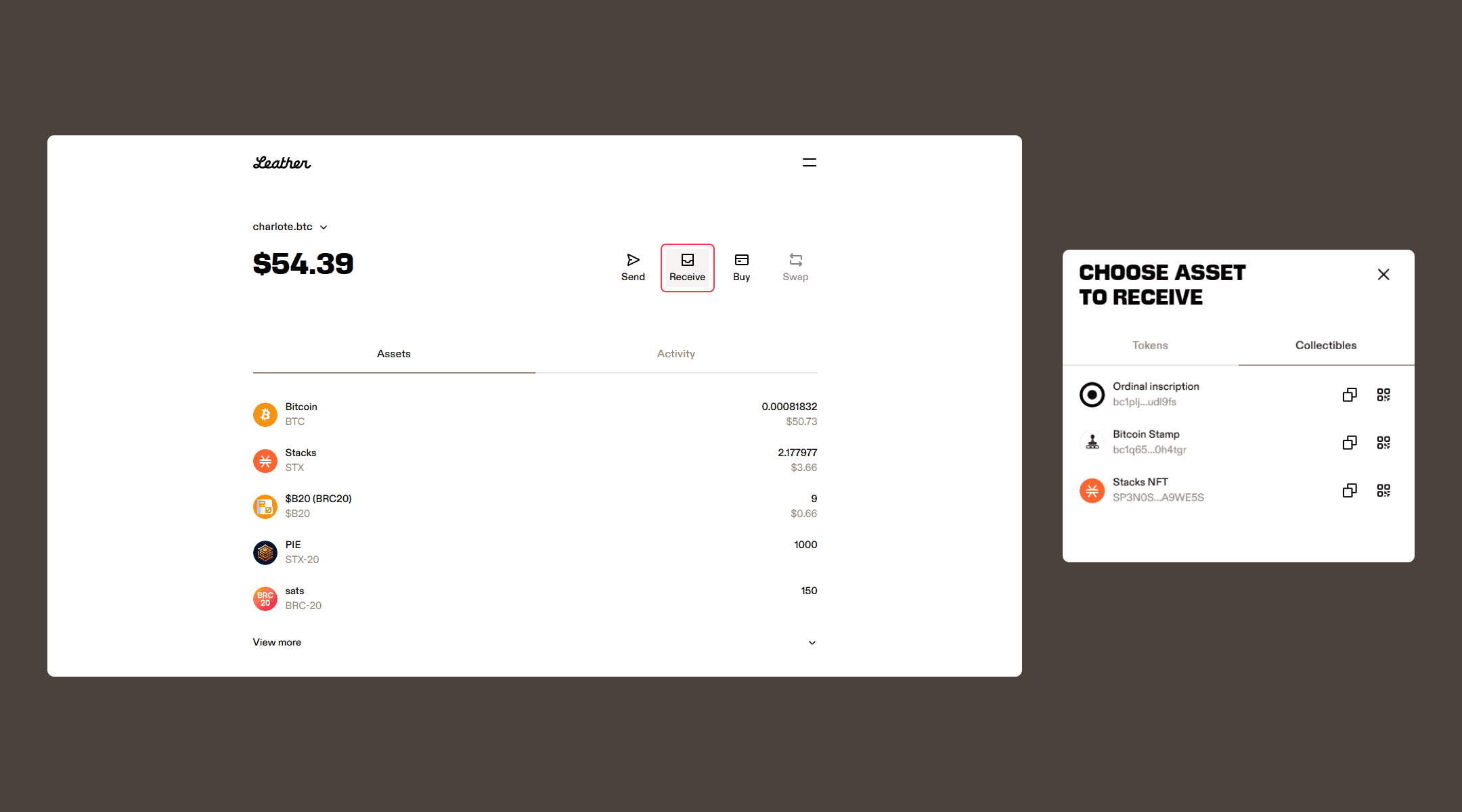
Once the transaction has been confirmed by the Bitcoin network, the collectibles you received will appear under the “Assets” tab in the “Collectibles” section (below your tokens).
Related articles
Disclaimer
Leather provides tools and guidance for receiving collectibles, but users are responsible for ensuring the correct address and transaction details. Leather does not verify the sender or the intent behind collectible transactions.